

Menu
This article describes how to remove Firebird when using Volume due to the vulnerabilities with Firebird 2.5.
The latest version of Firebird which is compatible with Volume is 2.5, which is now out of date. If this is causing a security risk, follow the steps below to reduce this.
Note that Firebird can only be deleted from the client machines, not the server itself.
Follow the steps below to uninstall Volume and Firebird before continuing.
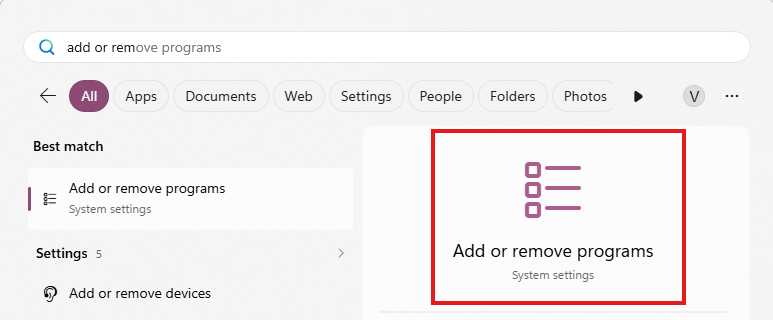
1. Open the Add or Remove Programs page in settings by typing this into the search bar and pressing Enter.
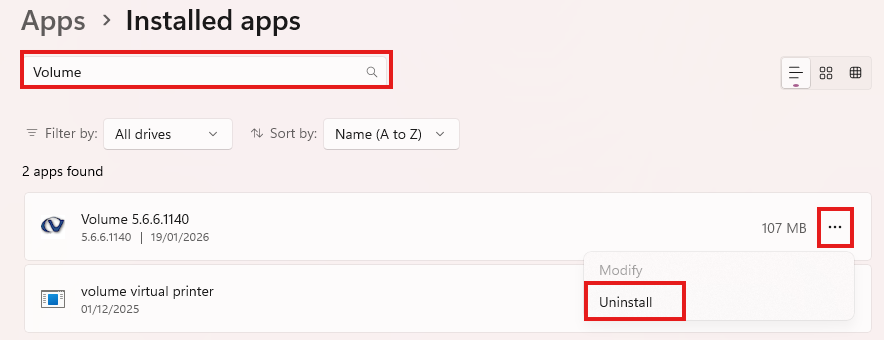
2. Search for Volume in the search bar. Click the three dots to the side of it and then click Uninstall.
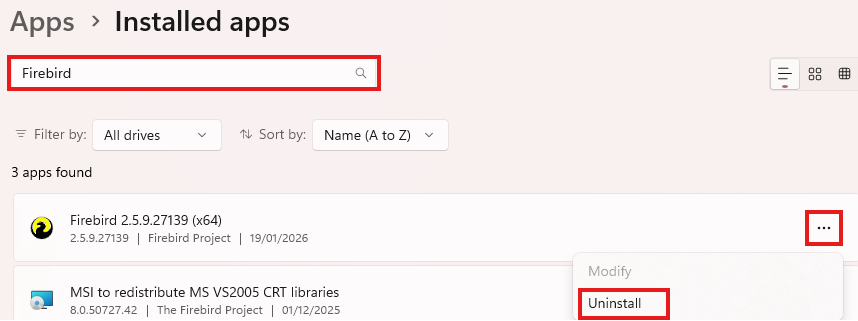
3. Search for Firebird in the search bar. Click the three dots to the side of it and then click Uninstall.
Now you are ready to follow the steps below.
Follow the steps below to install Volume alongside a flag to prevent the additional installation of Firebird.
1. Download the Volume installer from https://www.watermarktech.co.uk/support/install/ .

2. Open the file location where the installer is. Typically this will be the Downloads folder.
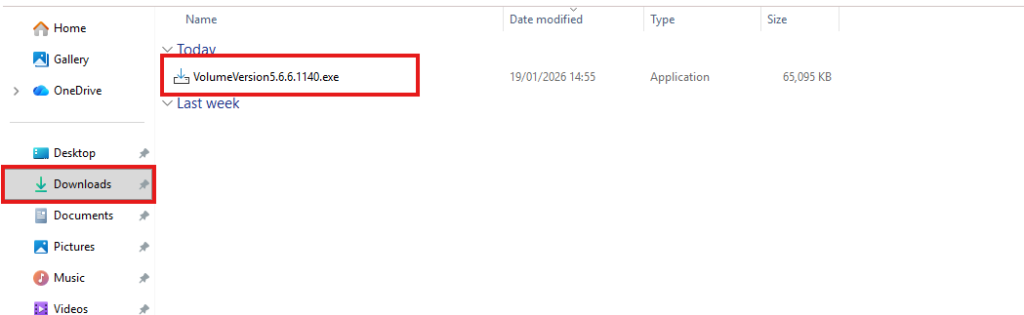
3. Within this file location, create a new file called "NoFirebird.txt". Do this by right clicking in a blank space, clicking "New" then "Text Document".

4. Run the Volume installer by double clicking on the exe file.

Now, the installer will not install Firebird during the Volume instillation process.

