

Menu
Only empty tabs can be deleted from inside a file and only empty rows can be deleted from inside a tab.
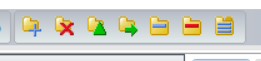
This toolbar will appear adjacent to the menus when a file has been selected. Depending on the user’s restrictions, certain buttons may not appear as they do in this example.

Button 1: Adds a Tab
Button 2: Deletes the currently selected Tab
Button 3: Modify currently selected Tab properties
Button 4: Move the selected Tab to a different Client File
Button 5: Add a new Row
Button 6: Delete the currently selected Row
Button 7: Apply a Client File structure Template
Each row has its own delete button to the far right labelled with a ‘x’. This will only delete its accompanying row, if it is empty.


